
When your business knows more than any one person ever could
Ask your data anything.
More systems, more people, no single view of what's happening. We connect it all into one trusted database, then bring the AI, the automation, and a team to run it - alongside yours.
How it works
Connect. Understand. Act.
Every system, one place
Stock, jobs, sales, POS, payroll, accounting - cloud or on-premise - synced securely into your own private database.
Ask, report, trust
Live dashboards, operational reports, and plain-English questions with cited answers. One version of the truth.
Automate the in-between
Workflows watch your data and act - reorders, statements, follow-ups, invoices - without anyone remembering to check.
You ask · in Claude Desktop
All your systems, one database, inside Claude Desktop
Lara loads only the changes from each of your cloud systems into one central database. Claude Desktop connects to that one database through the Lara MCP connectors, so it can answer from all your data together without connecting to each system on its own. From there your team can do more than ask questions: they can ask Claude to create new reports and dashboards inside Lara itself, through the Lara MCP connectors, or build reports and dashboards in Claude.
Your cloud systems
Cin7, Salesforce, Shopify, Xero, and others
API limits used by Lara's sync only
Lara
one place, the same for the whole team
One central database
all your systems, kept up to date
Integrations and workflows
what you build between your systems
Data model and glossary
what each table and term means
Reports and Spaces
dashboards within Larasoft
MyApp data records
holding data that isn't in your other systems
Lara MCP connectors
Claude Connect, two-way
You sign in
as yourself
Your role applies
you see only what you may
Every query logged
under your name
Claude Desktop
your whole team
- Asks questions
- Drafts reports, Spaces and workflows
- Adds MyApp records
- Builds Claude dashboards
The solid arrows show the direction data travels; the arrows between Lara, the MCP connectors and Claude Desktop point both ways, because Claude reads from Lara and saves Larasoft reports and dashboards back into it. Claude reads Lara's copy of your data, never Xero, Cin7, Salesforce or Shopify themselves, so a question can't change an invoice in Xero or an order in Shopify.
Why this matters
- 1
All your data, one question
Claude can join your stock in Cin7, orders in Shopify, pipeline in Salesforce and invoices in Xero in a single answer, because they already sit side by side in one database.
- 2
No rate limits to hit
Every cloud system limits how often it can be called. Lara's sync loads only the changes, and your team's questions go to Lara, not to each system. A growing team doesn't run into those limits.
- 3
Everyone on the same numbers
One central database for the whole team, so everyone works from the same data at the same time, in Claude, in reports and in Spaces.
- 4
It sees what you build
As you add integrations between your systems and workflows in Lara, Claude Desktop can see those too. There's nothing extra to connect.
- 5
Your security still applies
Role-based access applies to every question. Each person signs in as themselves and sees only what their Lara role allows.
See it in Claude Desktop
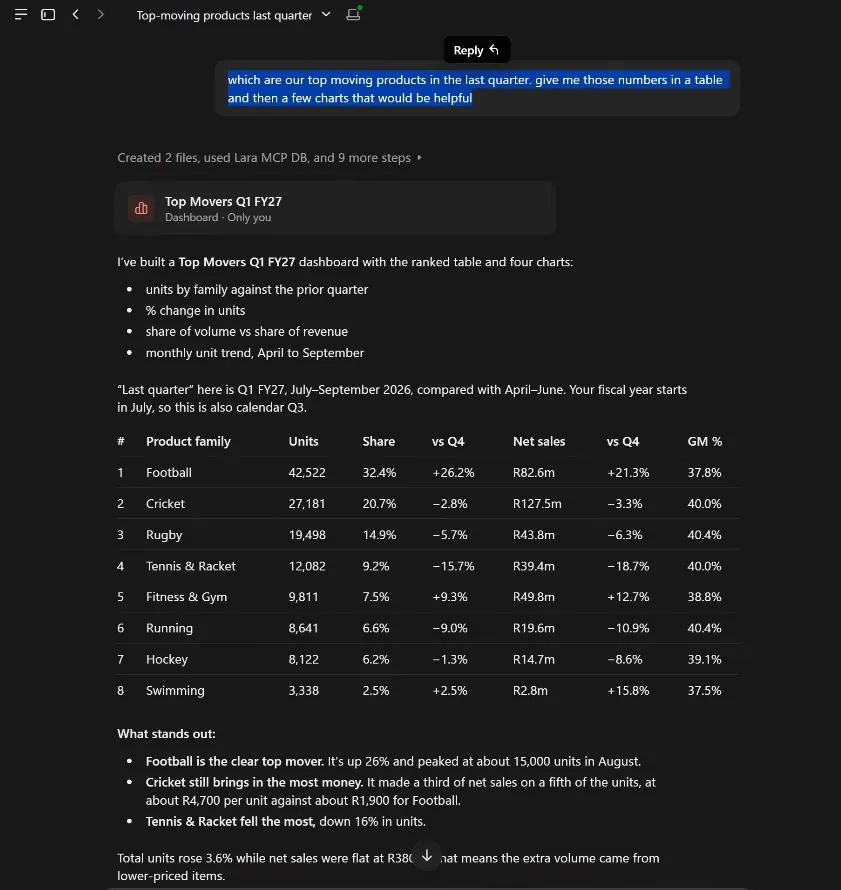
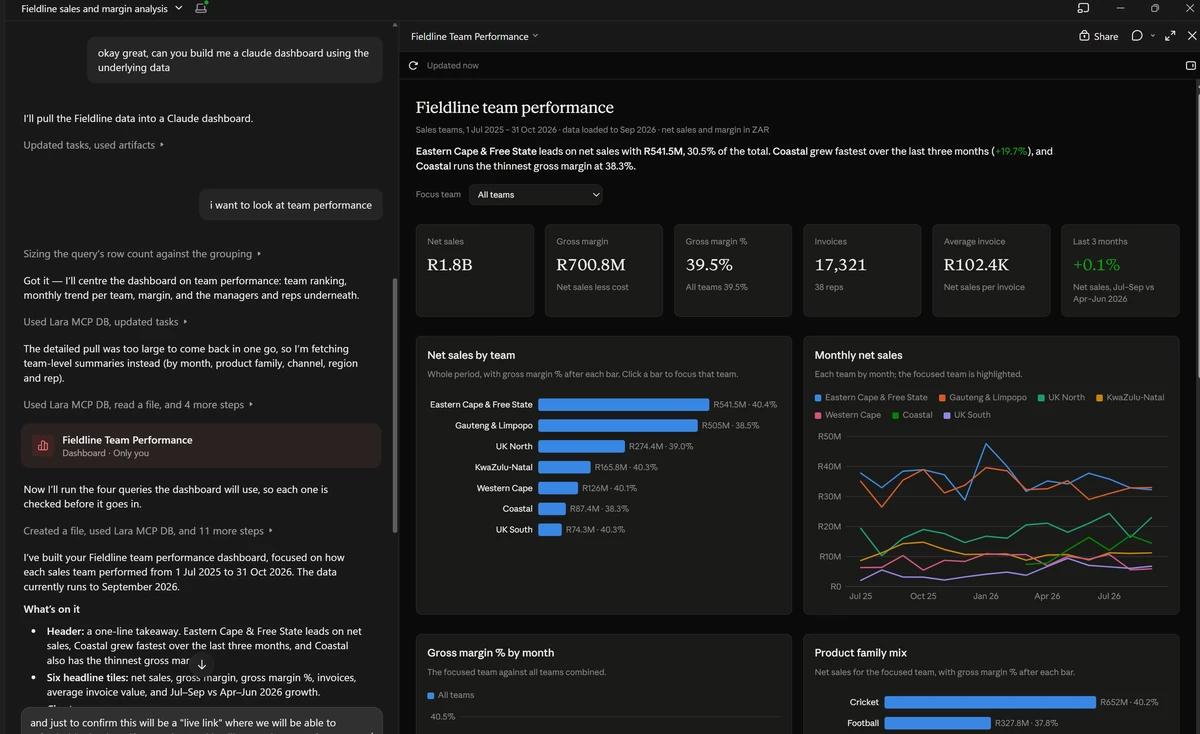
1. Ask. A ranked table and a short read-out. 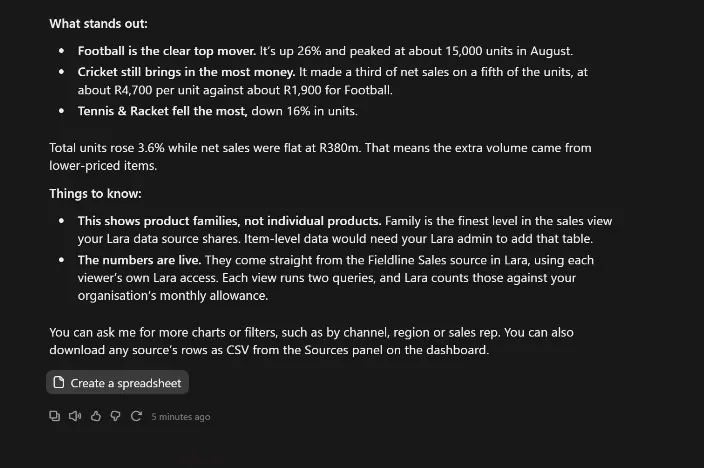
2. Read. What stands out, and the caveats. 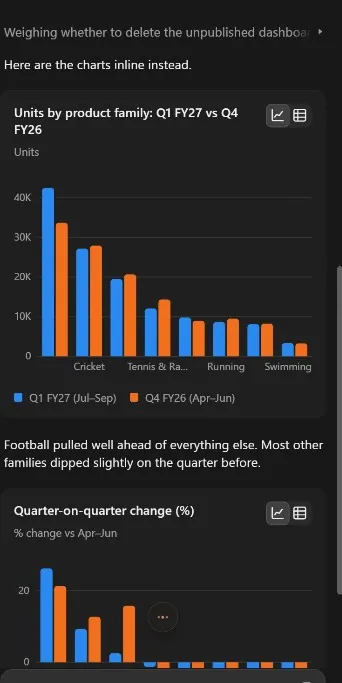
3. Chart. Units against the prior quarter. 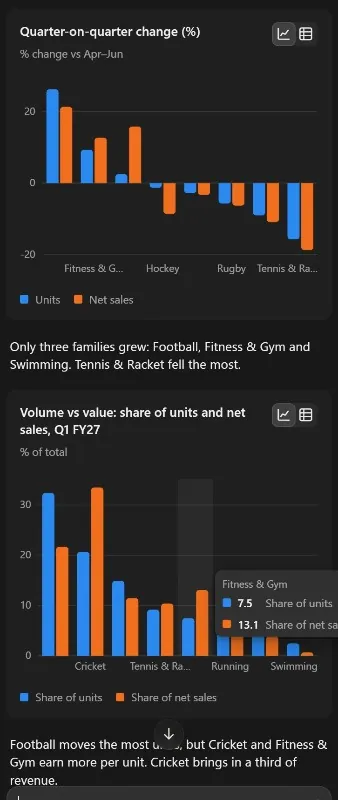
4. Compare. Change on the quarter and volume against value.
What your team can do from Claude Desktop
Ask questions
In plain English. Claude finds the tables your administrator has shared, writes the query, has Lara check it, and answers from your data.
"Which Shopify best-sellers are below reorder level in Cin7?"
Build reports and dashboards in Lara
Ask for a report, or a Space (a dashboard within Larasoft), and Claude creates it straight in the portal: the tiles, charts and filters. It is live there at once for anyone with access.
"Create a dashboard in Larasoft Spaces from that: sales by month and by rep, with a team filter."
Draft workflows
Describe an automation and Claude drafts it, checks it and test-runs it without changing anything. A person reviews the draft and publishes it in the portal.
"Draft a workflow that emails the rep when a Salesforce deal closes."
Add and update MyApp data records
MyApp holds data that isn't in your other systems, such as targets or contacts. Add or edit records, up to 100 at a time. Nothing is deleted this way.
"Add these twelve branch targets to the Targets table."
Build Claude dashboards
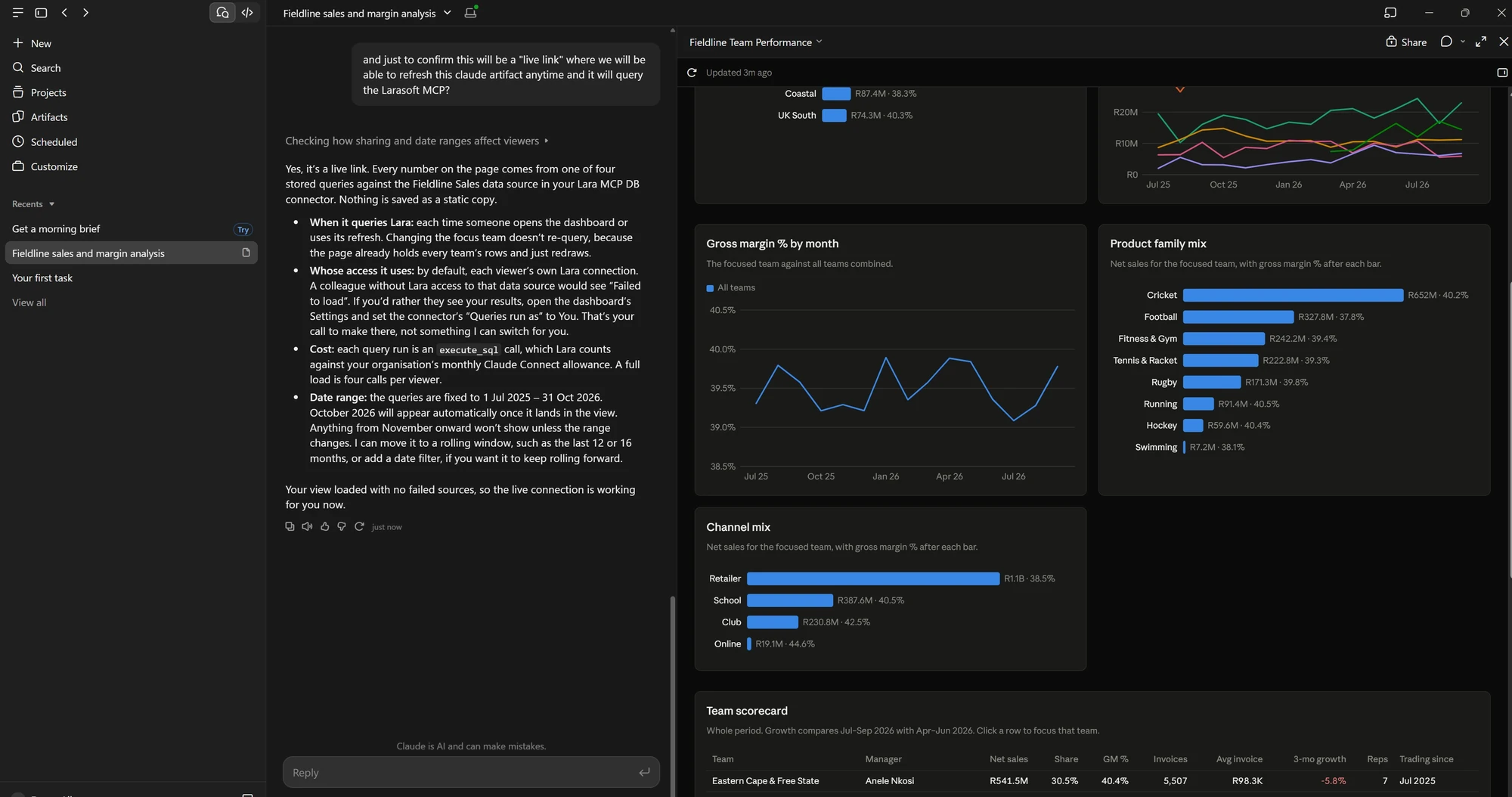
Turn an answer into a visual page: charts, tables and a short commentary, built from the Lara data Claude has just read.
"Make me a one-page view of this for Monday's meeting."
Who can do what
- Your roleClaude acts as the person signed in and can see and change only what that person can in the portal. If Lara refuses something, Claude doesn't try another way round it.
- Admin onlyCreating a new data source (a new set of data for reports and Spaces to use) is for your organisation's administrators. Everyone else builds on the data sources that already exist.
- Portal onlyPublishing a workflow, deleting records and designing MyApp tables stay in the portal, done by a person.
Start with your problem
What does your business already know that nobody can see?
The answers are in there. They are just spread across systems that do not talk to each other, and nobody has the hours to go and find them. If one of these sounds like your Tuesday, that is where we start.
The truth lives in five systems
“The stock system says one thing, the warehouse says another - and nobody's number agrees with the accounts.”
Stock, jobs, orders and billing synced into one source of truth your whole team can query.
See the solutionThe business runs on memory
“Reorders, approvals, chasing jobs and suppliers - it all depends on someone remembering to check.”
Workflows watch your data and act: alerts, drafts and updates that fire without being asked.
See the solutionEvery answer needs a specialist
“If our reporting person is on leave, nobody can answer a simple question about the numbers.”
Operational reports anyone can run - and plain-English answers from Lara when the report does not exist yet.
See the solutionChasing debtors eats the admin week
“Statements go out, follow-ups get forgotten, and replies land in three different inboxes.”
Automated statements and follow-ups - with replies threading back into one place.
See the solutionSales never reconcile to the ledger
“Takings, refunds and tender splits get re-captured by hand, and month-end is a hunt for the missing R400.”
Daily automated feeds post balanced journals to your accounting system - reconciled before you have had coffee.
See the solutionMonth-end across entities takes weeks
“Three companies, three ledgers, one giant consolidation spreadsheet that only one person understands.”
Every entity lands in one reporting database - consolidated dashboards that are always current.
See the solutionWorkflow automation
Describe the workflow. We build it for you.
Automations for your operation, not just your books. Tell us what should happen in plain English - we build it, dry-run it against your own data, and switch it on once you are happy. Nobody on your team has to learn a builder.
You: “When stock for any A-class item drops below its reorder point, check open POs and the supplier's lead time, then draft a purchase order for approval.”
Larasoft: Built and dry-run against your last 90 days - 4 steps. Live as soon as you approve it.
Watch
Invoice 7 days overdue
Decide
Skip accounts on payment plans
Act
Send the statement - replies thread back in
Watch
Job marked complete in the field
Decide
Check sign-off, parts used and hours
Act
Update stock, close the job, bill it - no re-typing
Every workflow runs on the same trusted database as your reporting - logged, cited, and dry-run before it goes live. Ask Lara what happened, and she can tell you.
Want it run for you end-to-end, not just switched on? That's our fractional AI & automation team, working inside your business from R30 000 a month.
Proof
Trusted by teams that depend on accurate data
Automation, built to fit
“Great automation company that takes the time to understand your requirements and help resolve them in the most cost efficient and time efficient way possible.”Jared D., Google review
Divisional reporting for the board
“We partnered with Larasoft to help us develop our divisional financial reporting for the Board in Power BI, in the aim to automate the data flow from Xero.”Rika V., Google review
Reporting, implemented end-to-end
“Allan and his team at Larasoft have helped us immensely with the reporting requirements we needed. From understanding to implementation and roll-out, it was a smooth process.”Sheetal B., Google review
Would you rather hear it from a customer than from us? During the pilot we can arrange a conversation with one of ours.
- prebuilt connectors
- 20+prebuilt connectors
- monitored syncs
- 24/7monitored syncs
- per-user fees
- Zeroper-user fees
How we work
A call. Then a pilot - or straight in.
No demos of someone else's data. Start with a tightly scoped pilot on yours, or go straight to a full rollout if you're ready - your call. We take it on where we can see a clear win for both sides: a genuine problem we know we can solve, for a business ready to act on the answer.
Tell us what has slipped
A short call about your systems and the one problem that costs you the most. If we can see the win, we'll agree whether to start with a tightly scoped pilot or go straight to a full rollout.
± 30 minutes · no obligation
We prove it on your data
We connect a slice of your real systems and build a small, tightly scoped pilot - your own data answering your own question.
small scope · fixed timeline
Go live and grow
The pilot becomes production: monitored syncs, dashboards and workflows, expanding as your organisation needs it.
your whole team included
Let your business tell you what it knows.
Giving you time to think differently.
Start with a call about the one thing that has slipped. We'll prove the answer with a tightly scoped pilot on your own data, or go straight to a full rollout if you're ready - then run it yourselves, or with our team alongside you.
or email hello@larasoft.global